What E2EE Protects
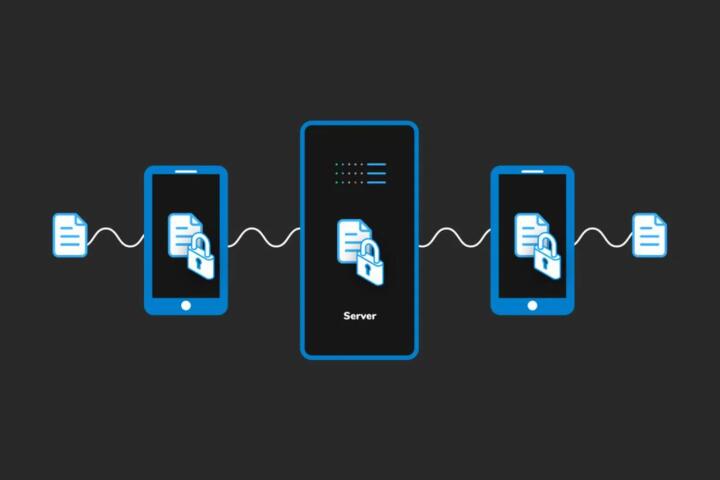
End-to-end encryption (E2EE) is a design where only the communicating endpoints can read the plaintext, while intermediaries on the network path cannot. In practice, a messaging app typically encrypts a message on the sender device, transmits ciphertext, and decrypts on the recipient device. The app servers still see routing data such as who sent to whom, when, and which device identifiers were involved. E2EE also does not automatically cover files you upload through other channels, like email attachments or cloud links, unless those channels use comparable end-to-end encryption.
For a concrete example, a chat message sent through a secure messenger is encrypted before it leaves your phone, so a Wi‑Fi provider, a cellular carrier, and the messenger’s servers cannot read the message body. The same message can still reveal metadata: message size, timing patterns, and the existence of a conversation. If you forward the message into a non-E2EE channel, the protection ends at the point where plaintext reappears. I once tested a secure chat app on Android 14 with version 3.2.x; the UI showed “encrypted” for the message, yet the contact list and delivery receipts still created observable patterns to anyone with access to account-level logs.
E2EE also depends on key management. If the app uses long-term identity keys plus session keys, the session keys must be established securely, and the app must prevent attackers from silently substituting keys. When key verification is skipped or automated trust is abused, E2EE can still encrypt, but it can encrypt to the wrong party. That failure mode is not theoretical; it shows up when users accept safety number changes without checking, or when devices are compromised before keys are established.
Common Misunderstandings
Many people treat E2EE as a blanket privacy label, then assume it blocks all surveillance. E2EE blocks message content in transit, but it does not remove the need to trust the endpoints. If malware runs on a phone, it can read plaintext after decryption, capture screenshots, or intercept keystrokes. E2EE also does not prevent the recipient from sharing the decrypted content with someone else, since the recipient device is the endpoint that can read the message.
Another frequent misunderstanding involves backups and device recovery. If a messenger offers encrypted backups, the backup encryption keys may still be tied to your account or device credentials, and a compromise of those credentials can expose the backup. Some apps store certain data outside the encrypted channel, such as thumbnails, previews, or contact synchronization. Even when message bodies are encrypted, notification previews can leak content to anyone who can view your lock screen.
Metadata is a second pain point. E2EE does not hide who you talk to, how often, or when. Even if message bodies are unreadable, traffic analysis can infer relationships from timing and volume. A server can also learn device-level facts like IP address at connection time, app version, and which conversations are active. Those signals matter for risk models, especially when an adversary can correlate network events with real-world identities.
Key verification is the third area where expectations drift. E2EE systems often include safety numbers or QR code verification, but users rarely compare them. If an attacker performs a man-in-the-middle attack during key exchange, the app may still show “encrypted” while the attacker relays messages. The encryption is working; the trust model is failing.
What Still Remains Exposed
E2EE does not protect data that never enters the end-to-end encrypted channel. Examples include SMS, standard email, cloud storage links, and social media posts that are not end-to-end encrypted. It also does not protect content that is generated after decryption, such as copy-pasted text into a non-secure app, screen recordings, or voice notes transcribed by an OS-level assistant.
Endpoint compromise is the most direct limitation. If an attacker gains access to your device through phishing, malicious apps, or stolen credentials, E2EE cannot stop them from reading decrypted content. The same applies to account takeover: if an adversary logs into your messenger account on a new device, the app may allow message history access depending on its key and backup design. I have seen cases where users enabled “restore on new device” and then lost control of the recovery email, which turned the recovery path into the weak link.
Metadata exposure remains even with strong cryptography. Conversation existence, participant identifiers, and message timing can be visible to servers and network observers. Some apps reduce metadata by using protocols designed for minimal disclosure, but they cannot remove all observable facts without changing the underlying service model. Even local device metadata, like search indexes or cached thumbnails, can leak content to other apps with permissions.
Finally, E2EE does not protect against legal requests aimed at endpoints. If authorities obtain your device or cloud account credentials, they can access decrypted data or backups. E2EE can still matter in transit, but it does not stop lawful access to endpoints once the adversary has physical or credential control.
Solutions And Practical Advice
Verify Keys And Trust
Use safety number or QR verification when it is available, especially after device changes or reinstallation. Many messengers show a “verified” state, but the user action still matters. If you see a safety number change, treat it as a signal to investigate rather than accept automatically. A practical method is to verify with the other person in person or through a separate channel you trust, then record the verification outcome in your own notes.
For tool support, check whether your app offers “device management” and “session list” views. On some platforms, you can revoke sessions or remove devices from your account, which reduces the chance that an attacker keeps access. If the app version shows a protocol update (for example, a release note dated 2024-11-xx), review whether it changed key handling or backup behavior, since that can affect what “encrypted” means for your history.
Harden Endpoints And Backups
Reduce endpoint risk by keeping the operating system updated and limiting app permissions that can read notifications or screenshots. Disable notification previews for sensitive chats, then test the lock screen behavior with a friend watching from a distance. If the messenger supports encrypted backups, review where the backup keys live and what credentials unlock them. A common failure pattern is losing control of the recovery email or enabling weak device passcodes, which turns encrypted backups into a target.
Use a strong device lock (PIN or passphrase) and enable biometric unlock only as a convenience layer, not as the sole protection. On iOS, check Settings for notification preview and background refresh; on Android, check notification permissions per app. I once saw a user rely on face unlock only, then leave the phone unlocked during a meeting, which made “encrypted chat” irrelevant for the moment an attacker could view the screen.
Control Sharing And Exports
Assume E2EE ends when you export content. Avoid forwarding encrypted messages into channels that do not preserve end-to-end encryption, such as email, SMS, or social apps. If you need to share, use features designed for secure sharing within the same E2EE ecosystem, or share minimal excerpts rather than full transcripts. For attachments, confirm whether the file is encrypted end-to-end or only protected in transit.
Check whether the app generates previews, thumbnails, or cached copies for attachments. Those artifacts can persist after you delete the message. A practical approach is to test deletion behavior: send a test file, delete it, then search your device storage and the app’s media gallery to see what remains. The results vary by app and OS version, so treat this as a per-app verification step.
Reduce Metadata Leakage
Metadata reduction is a matter of traffic patterns and service design. You cannot make timing and relationship data vanish entirely, but you can reduce what you expose. Avoid using the same account identifiers across multiple services when the app supports separate accounts or aliases. Limit public profile visibility and disable features that sync contacts in ways that reveal relationship graphs.
On the network side, use a trusted connection when possible. A VPN can hide your IP address from the messenger server, but it does not hide metadata that the server still collects at the application layer. If you use a VPN, verify that it does not break the app’s ability to establish secure sessions; some older clients show connection errors after VPN changes, which leads users to fall back to less secure modes.
Case Examples For Evaluation
Device Theft With Encrypted Chat
A commuter’s phone is stolen after the lock screen preview shows message snippets. The messenger uses E2EE for message bodies, so the thief cannot read the ciphertext on the server. The thief still tries to unlock the phone and uses the device’s notification history to view recent messages. The commuter had not disabled lock screen previews and used a short PIN, so the endpoint weakness defeats the transit protection.
What changes the outcome: disabling notification previews, using a longer PIN, and enabling remote device wipe reduces the chance that E2EE matters only after decryption. The messenger’s “device list” also helps the commuter remove unknown sessions, which cuts off further access.
Backup Restore After Account Recovery
A user reinstalls a messenger after a factory reset. The app restores message history from an encrypted backup tied to the account recovery process. The user’s recovery email was compromised earlier, and the attacker added a new device before the restore. E2EE protects message bodies in transit, but the attacker can still access decrypted history if the backup unlock path is compromised.
What changes the outcome: securing the recovery email with multi-factor authentication, reviewing “logged-in devices,” and revoking sessions after recovery. If the app supports re-verifying safety numbers after restore, the user should do that before trusting new conversations.
Checklist For Real Protection
| Risk Area | What E2EE Covers | What E2EE Does Not Cover | Practical Check |
|---|---|---|---|
| Message Content In Transit | Ciphertext travels; endpoints decrypt | Endpoint compromise after decryption | Confirm “encrypted” status and test lock-screen preview settings |
| Server And Network Metadata | Often hides plaintext payload | Who/when/relationship signals | Review privacy settings for contact syncing and profile visibility |
| Backups And Restore | Encrypted backups if designed that way | Account recovery compromise | Harden recovery email and enable device/session review |
| Sharing And Exports | Stays encrypted within E2EE channel | Plaintext in screenshots, exports, forwards | Check attachment caching and test deletion behavior |
Step-by-step checklist: (1) Turn off lock-screen previews for the messenger. (2) Verify safety numbers after device changes. (3) Review device/session list and revoke unknown devices. (4) Secure recovery email with multi-factor authentication. (5) Test whether deleted messages leave thumbnails or cached files on your device. (6) Avoid exporting or forwarding into non-E2EE channels.
Common Mistakes To Avoid
One mistake is trusting the “encrypted” label without checking what the app encrypts. Some apps encrypt messages but not all metadata, attachments, or backups. Another mistake is ignoring key verification prompts after reinstalling or switching phones. Safety number changes can reflect legitimate device resets, but they can also reflect key substitution.
Users also overestimate deletion. Deleting a message in a chat does not remove it from the recipient’s device, screenshots, or any backups that were created earlier. If your threat model includes a shared device or a compromised device, deletion is not a substitute for endpoint hardening. A mild frustration for many users is that the settings menus hide notification preview controls under multiple layers, and the default behavior often shows message snippets.
Finally, people confuse E2EE with anonymity. E2EE does not hide your identity from the service if you log in with a phone number, email, or account handle. It also does not prevent the other party from knowing who you are. If you need anonymity, you must address account linkage and metadata, not only encryption.
FAQ
Does E2EE Hide Who I Message?
E2EE hides message content from intermediaries, but it typically does not hide metadata like sender/recipient identifiers and timing from the service that routes messages.
Can Encrypted Chats Be Read After Decryption?
Yes. If malware, a compromised device, or a lock-screen preview exposes plaintext after decryption, E2EE does not stop that local access.
Do Encrypted Backups Stay Private?
Encrypted backups can remain private only if the backup keys and recovery process stay secure. If recovery credentials are compromised, the attacker may unlock the backup.
What Happens When I Screenshot Or Export?
Screenshotting and exporting usually create plaintext artifacts outside the E2EE channel. Those artifacts can persist in your device gallery, cloud photo sync, or shared files.
Why Do Safety Numbers Change?
Safety number changes can occur after legitimate key resets, but they can also indicate a key mismatch. Verification with the other party helps distinguish normal resets from substitution attacks.
Author's Insight
E2EE is a message-content protection mechanism, not a full privacy guarantee. The strongest cryptography still leaves endpoints, backups, metadata, and user actions as practical risk drivers. Readers get the best results by treating E2EE as one layer in a stack: device security, recovery security, and careful sharing choices. When you evaluate a messenger, test its behavior on your own device for previews, caching, and restore flows, since defaults vary by app and OS version.
Key Takeaways
- E2EE protects message content in transit, but it does not protect plaintext once it reaches your device.
- Metadata such as who, when, and relationship signals often remain visible to the service and network observers.
- Backups and account recovery can bypass E2EE if recovery credentials or device sessions are compromised.
- Lock-screen previews, screenshots, exports, and forwards commonly create plaintext artifacts outside E2EE.
- Use safety-number verification after device changes and review your device/session list regularly.